Workflow State Indicator
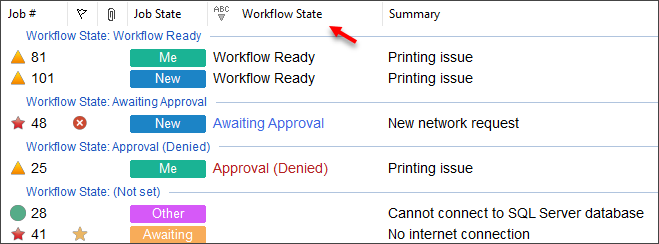
This “Workflow State” field indicates the current state of the workflow that is associated with job.
Workflow states include:
- Workflow Ready (there is workflow to be completed)
- Workflow Complete (all workflow has been completed)
- Workflow Paused (workflow has been paused by a Workflow Pause object)
- Awaiting Approval (An approval] has been initated, and waiting for response)
- Approval (Denied) (The latest approval has been rejected / denied)
- Approval (Approved) (The latest approval has been accepted / approved)
Note - this field is for informational purposes only. It has no intrinsic feature in itself - it is simply an indicator and a database data-point that you can then use for visual purposes, trigger further actions, or report on.
The “Workflow State” column is available via the Field Chooser for Jobs.
Use
Use the Field Chooser to select this column from the Jobs section.
See also
Field Chooser to add the workflow state as a column
Job Finder can search / filter on the worfklow state
The Priority Manager can build automation profiles around the workflow state
Feedback
Was this page helpful?
Glad to hear it! Please tell us how we can improve.
Sorry to hear that. Please tell us how we can improve.