Workflow, Process and Automation
Depending on which ITSM tool you’re moving from, and the process and automation maturity and integration that you used, there is likely some (or alot!) of process and automation configuration to migrate.
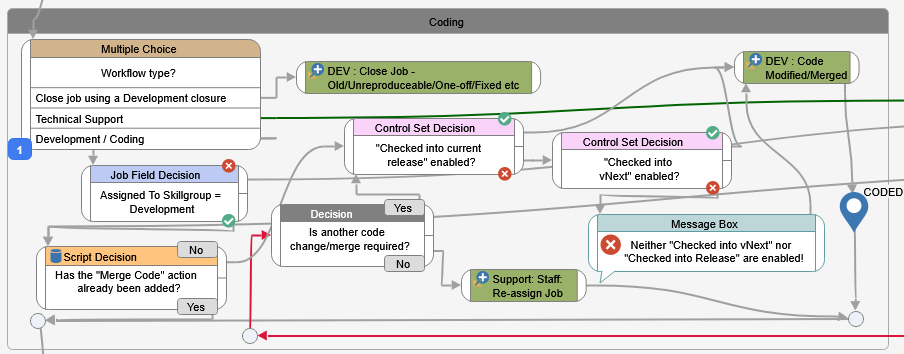
Workflow, process and automation look different in many ITSM tools, and they way that one tool implements these features may be drastically different, or missing completely from other tools.
Basic Automation and Triggers
These days, most tools support some sort of “if this…then that” style of triggered automation. You set the criteria for a trigger, and then set the action that should follow.
For example:
If a ticket is market as “Urgent”, and hasn’t been acknowledged within 2 hours, send an email to the person it’s assigned to, as well as the group, and also the manager.
HelpMaster support this style of automation via the Priority Manager. It support a wide range of escalation, notification and ticket modification options that are based on a defined trigger.
HelpMaster uses the Priority Manager and Triggered Events for automation triggers.
Don’t just re-implement workflow and process
A question worth considering before re-implemting process and automation is “Do I really need to?” Only re-implement if it makes sense. In some cases, the native functionality of a product may mean that automation profiles and other triggers (or script hacks) may not even be needed. Perform a careful review of the process and automation in the legacy tool, and determine whether it (or something like it), really needs to be migrated across.
If you’re going to be building workflow and process from scratch, and no-doubt you will be because many tools do not support importing this type of configuration, now is the perfect time to get together with the team to discuss what worked, what didn’t and wether the process was genuinely effecting in delivering service operaitons.
HelpMaster has a powerful and flexible Workflow designer.
Take the time to re-engineer process and workflow and start the new tool configuration with a coat of fresh “workflow” paint.
Be sure to keep everyone on the loop and keep the communication and education relevant.
Feedback
Was this page helpful?
Glad to hear it! Please tell us how we can improve.
Sorry to hear that. Please tell us how we can improve.